

Knowledge Base Detail
Copy Key:
Source: https://apple.stackexchange.com/questions/130946/where-does-os-x-store-my-adobe-product-keys
For adobe CS5, look in /Library/Application Support/Adobe/Adobe PCD/cache/cache.db: this is a sqlite database (you can open it with sqlite3).
sqlite3
.open "cache.db"
Then run the query:
select * from domain_data where key='SN';
Find SQLLite-Browser on smb01/share/Software/Helps
or terminal…
use integer-key to install.
Install on newer systems
Source: https://helpx.adobe.com/creative-cloud/kb/install-creative-suite-mac-os-sierra.html
Creative Suite 5.5, 5, and 4
-
Mount the Disk Image file for the Creative Suite application.
-
Open the mounted DMG file.
-
Right-click Install.app and select Open Package Contents from the context menu.
Note:
For Creative Suite 4, right-click Setup.app.
-
Navigate to Contents > MacOS.
-
Drag the Unix executable to the Terminal.
Note:
Navigate to Go > Utilities to open the Terminal window.

-
Press return to launch the installer.
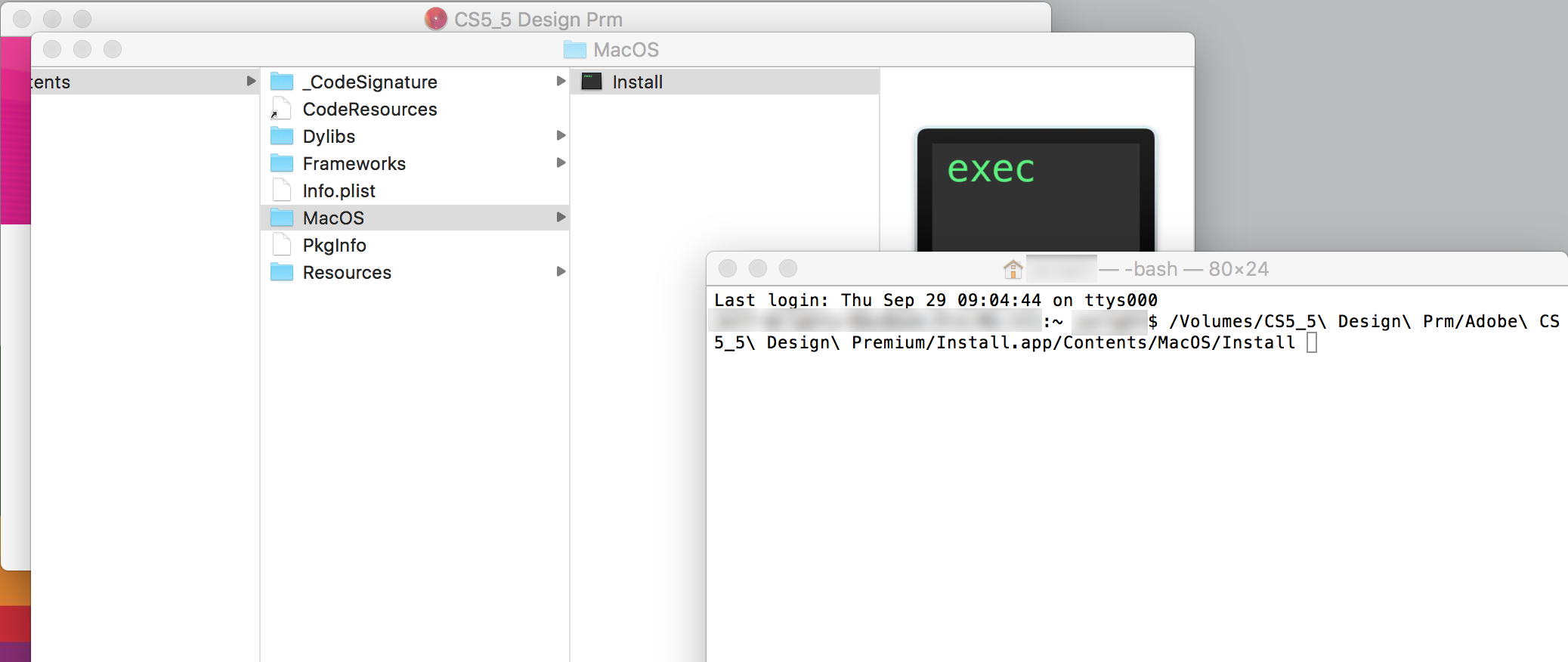
Important:
Copy File —->
Backup-Path / Library / ScriptingAdditions / Adobe Unit Types.osax
Source: https://helpx.adobe.com/de/photoshop/kb/error-one-or-files-application.html
 SoftKey280Revealer.zip